
How to Build a Weather App Using HTML, CSS, OpenWeatherMap API Tutorial
Welcome to the CodeWithRandom blog! In this step-by-step tutorial, we are building a simple but functional Weather App using HTML and CSS with the OpenWeatherMap API.
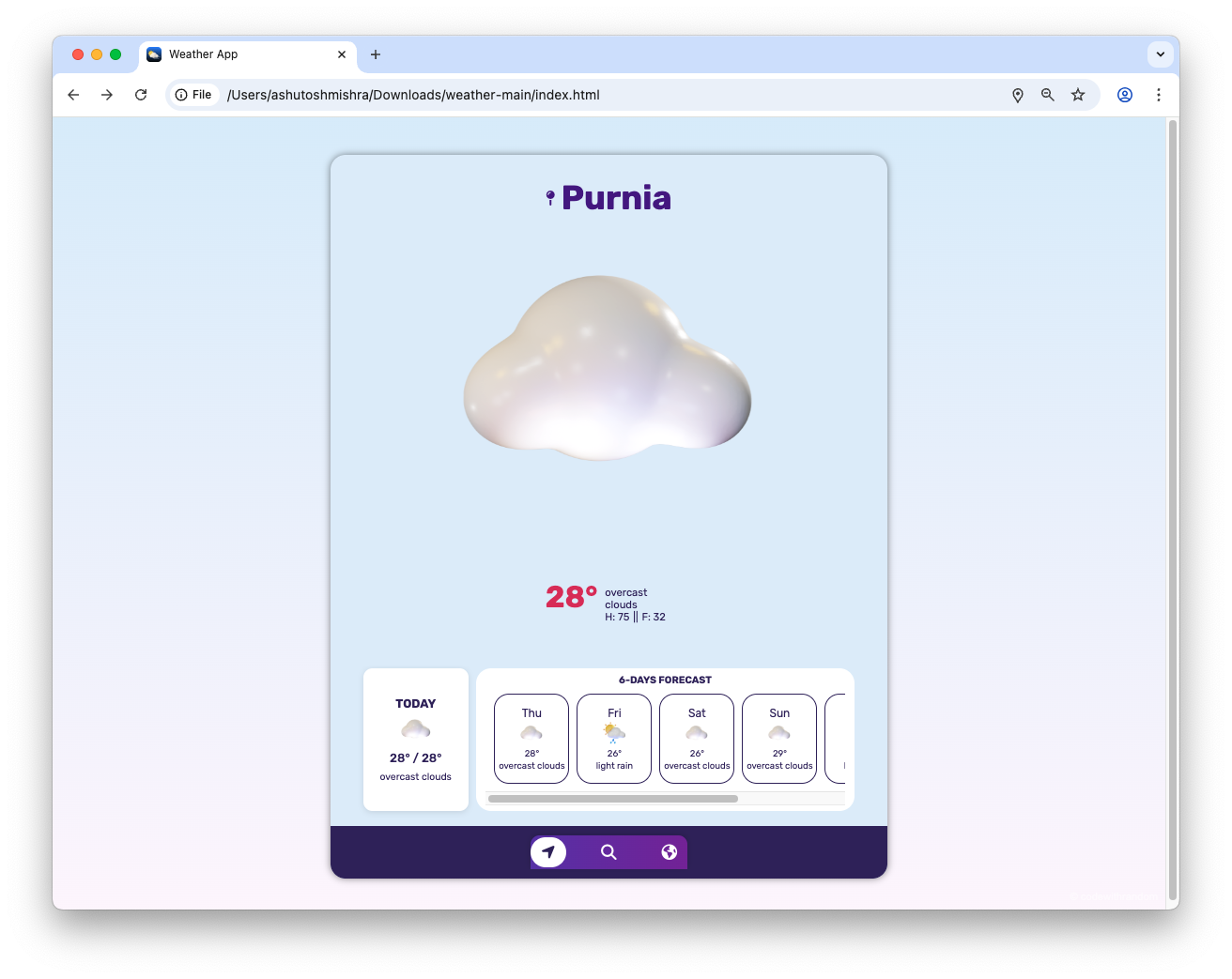
This app displays the current temperature, detailed weather information, and a 6-day forecast for any city worldwide.
It comes with a Home page, a Search page, and a World/Explore page, all connected through a clean bottom navigation bar.
The design is fully responsive, mobile-friendly, and easy to customise, making it perfect for beginners and intermediate developers.
Features
| Current city weather display |
| Temperature, humidity, and “feels like” data |
| Today’s min/max temperature |
| 6-day weather forecast |
| Search functionality for any city |
| World view to explore multiple locations |
| Simple bottom navigation bar |
| Mobile-friendly UI |
Project Structure
weather-app/
├─ index.html        # Home page
├─ search.html       # Search weather by city
├─ world.html        # World/Explore page
├─ css/
│  ├─ style.css
│  ├─ search.css
│  └─ world.css
├─ js/
│  ├─ main.js
│  ├─ search.js
│  └─ world.js
└─ img/
   ├─ icon.png
   ├─ sun.png
   └─ other weather icons
How the Pages Work
1. Home (index.html)
The Home page shows:
- The city name with a pin icon
- A weather icon (e.g., sun, clouds, rain)
- Current temperature
- Main weather description (Sunny, Rainy, etc.)
- Humidity and feels-like temperature
- A “Today” forecast card
- A “6-Days Forecast” section
Example snippet from index.html:
<div class="city-name">
  <i class="fa-solid fa-map-pin"></i>
  <h1 id="city-name">Mumbai</h1>
</div>

<div class="weather-description">
  <div class="show-metric" id="metric">0°</div>
  <div class="weather-details">
    <div class="weather-main" id="weather-main">Sunny</div>
    <div class="h-f">
      <div class="show-humidity">H: <span id="humidity">60</span></div>
      ||
      <div class="show-humidity">
        F: <span id="feels-like">60</span>
      </div>
    </div>
  </div>
</div>
2. Search (search.html)
This page allows you to type a city name and get the weather instantly.
It reuses the same UI pattern but updates based on your search.
3. World (world.html)
The World/Explore page lets you view weather from multiple saved cities.
It’s useful if you want to track different locations at once.
API Used
The app uses the OpenWeatherMap API, including:
- Geocoding API – to get coordinates for a city name
- Current Weather API – for live weather
- 5-Day / 3-Hour Forecast API – to build the forecast cards
Setup Guide
- Download the project or copy the file structure above.
- Sign up at OpenWeatherMap to get your API key.
- In your JavaScript file (
main.js,search.js,world.js), replace:
const API_KEY = "YOUR_API_KEY";
with your actual API key.
- Open
index.htmlin a browser to see the app in action
Here is The Complete Weather Project Source Code:
index.html
<!DOCTYPE html>
<html lang="en">
  <head>
    <meta charset="UTF-8" />
    <meta name="viewport" content="width=device-width, initial-scale=1.0" />
    <!-- links -->
    <link rel="icon" type="png" href="img/icon.png" />
    <link
      rel="stylesheet"
      href="https://cdnjs.cloudflare.com/ajax/libs/font-awesome/6.4.0/css/all.min.css"
    />
    <link rel="stylesheet" href="css/style.css" />
    <!-- Title -->
    <title>Weather App</title>
    <style>
      body {
        background: linear-gradient(180deg, #e3f2fd, #ffffff);
        font-family: "Poppins", sans-serif;
        margin: 0;
        padding: 0;
      }

      .city-name {
        display: flex;
        align-items: center;
        gap: 8px;
        font-weight: bold;
        font-size: 1.4rem;
        color: #0277bd;
      }

      .show-metric {
        font-size: 2.5rem;
        color: #ef6c00;
        font-weight: bold;
      }

      .today-forecast {
        background: #f1f8e9;
        padding: 10px;
        border-radius: 10px;
        box-shadow: 0 2px 6px rgba(0, 0, 0, 0.1);
        transition: transform 0.2s ease;
      }

      .today-forecast:hover {
        transform: scale(1.03);
      }

      nav ul {
        display: flex;
        justify-content: space-around;
        padding: 10px 0;
        list-style: none;
        background: #ffffff;
        box-shadow: 0 -2px 6px rgba(0, 0, 0, 0.1);
        border-radius: 10px 10px 0 0;
      }

      nav ul li a {
        color: #444;
        font-size: 1.2rem;
        padding: 6px 12px;
        border-radius: 6px;
        transition: background 0.3s, color 0.3s;
      }

      nav ul li a:hover {
        background: rgba(0, 0, 0, 0.05);
        color: #0277bd;
      }

      /* Watermark style */
      .watermark {
        position: fixed;
        bottom: 10px;
        right: 10px;
        font-size: 14px;
        color: rgba(0, 0, 0, 0.4);
        font-family: Arial, sans-serif;
        pointer-events: none;
        user-select: none;
      }
    </style>
  </head>

  <body>
    <!-- main section -->
    <div id="screen">
      <!-- city name -->
      <div class="city-name">
        <i class="fa-solid fa-map-pin"></i>
        <h1 id="city-name">Mumbai</h1>
      </div>
      <!-- weather icon -->
      <div class="weather-icon-css">
        <img class="weather-icon" src="img/sun.png" />
      </div>
      <!-- weather details -->
      <div class="weather-description">
        <div class="show-metric" id="metric">0°</div>
        <div class="weather-details">
          <div class="weather-main" id="weather-main">Sunny</div>
          <div class="h-f">
            <div class="show-humidity">H: <span id="humidity">60</span></div>
            ||
            <div class="show-humidity">
              F: <span id="feels-like">60</span>
            </div>
          </div>
        </div>
      </div>
      <!-- Today-forecast -->
      <div class="forcasts-box">
        <div class="today-forecast">
          <h4>TODAY</h4>
          <div class="weather-icon-today">
            <img class="weather-icons" src="img/sun.png" />
          </div>
          <div class="temp-today">
            <span id="temp-min-today">50°</span> /
            <span id="temp-max-today">55°</span>
          </div>
          <div class="weather-main-today" id="weather-main">Sunny</div>
        </div>

        <!-- 6day Forecast -->
        <div class="future-forecast">
          <h5>6-DAYS FORECAST</h5>
          <div id="future-forecast-box"></div>
        </div>
      </div>
      <!-- nav section -->
      <nav>
        <ul>
          <li>
            <a class="active" href="index.html"
              ><i class="fa-solid fa-location-arrow"></i
            ></a>
          </li>
          <li>
            <a href="search.html"
              ><i class="fa-solid fa-magnifying-glass"></i
            ></a>
          </li>
          <li>
            <a href="world.html"><i class="fa-solid fa-earth-americas"></i></a>
          </li>
        </ul>
      </nav>
    </div>

    <!-- watermark -->
    <div class="watermark">© codewithrandom</div>

    <!-- script -->
    <script src="js/main.js"></script>
  </body>
</html>
<style>
  body {
    background: linear-gradient(180deg, #dceefb, #fdf6fd);
    font-family: "Poppins", sans-serif;
    margin: 0;
    padding: 0;
    color: #333;
  }

  .city-name {
    display: flex;
    align-items: center;
    gap: 8px;
    font-weight: bold;
    font-size: 1.4rem;
    color: #4a148c;
  }

  .show-metric {
    font-size: 2.5rem;
    color: #d81b60;
    font-weight: bold;
  }

  .today-forecast {
    background: #ffffff;
    padding: 10px;
    border-radius: 12px;
    box-shadow: 0 2px 8px rgba(0, 0, 0, 0.1);
    transition: transform 0.2s ease;
  }

  .today-forecast:hover {
    transform: scale(1.03);
  }

  nav ul {
    display: flex;
    justify-content: space-around;
    padding: 10px 0;
    list-style: none;
    background: linear-gradient(90deg, #5e35b1, #7b1fa2);
    box-shadow: 0 -2px 8px rgba(0, 0, 0, 0.15);
    border-radius: 12px 12px 0 0;
  }

  nav ul li a {
    color: #ffffff;
    font-size: 1.3rem;
    padding: 8px 14px;
    border-radius: 8px;
    transition: background 0.3s, transform 0.2s;
  }

  nav ul li a:hover {
    background: rgba(255, 255, 255, 0.15);
    transform: translateY(-2px);
  }

  /* Watermark style */
  .watermark {
    position: fixed;
    bottom: 10px;
    right: 10px;
    font-size: 14px;
    color: rgba(255, 255, 255, 0.5);
    font-family: Arial, sans-serif;
    pointer-events: none;
    user-select: none;
  }
</style>
Preview Of Index.html:

world.html
<!DOCTYPE html>
<html lang="en">

<head>
  <meta charset="UTF-8">
  <meta name="viewport" content="width=device-width, initial-scale=1.0">
  <!-- links -->
  <link rel="icon" type="png" href="img/icon.png" />
  <link rel="stylesheet" href="https://cdnjs.cloudflare.com/ajax/libs/font-awesome/6.4.0/css/all.min.css" />
  <link rel="stylesheet" href="css/world.css" />
  <!-- Title -->
  <title>Document</title>
</head>

<body>
  <div id="screen">
    <!-- main section -->
    <div class="section">
      <div class="date">April 7, 2024</div>
      <div class="button"><i class="fa-solid fa-circle-plus btn-icon"></i></div>
    </div>
    <!-- add section -->
    <div class="section-box">
      <div class="add-section">
        <div class="add-section-title">
          <h2>Add a new place</h2>
        </div>
        <!-- search -->
        <div class="search">
          <div class="search-icon"><i class="fa-solid fa-location-dot"></i></div>
          <input class="searchinput" type="text" placeholder="search...">
        </div>
        <!-- error message -->
        <div class="messages">
          <div class="error-message">City not found</div>
          <div class="normal-message">Search your city to add</div>
          <div class="added-message">Succefy added ✔</div>
        </div>
      </div>
    </div>
    <!-- All City -->
     <div class="city-box"></div>
    <!-- nav section -->
    <nav>
      <ul>
        <li><a href="index.html"><i class="fa-solid fa-location-arrow"></i></a></li>
        <li><a href="search.html"><i class="fa-solid fa-magnifying-glass"></i></a></li>
        <li><a class="active" href="world.html"><i class="fa-solid fa-earth-americas"></i></a></li>
      </ul>
    </nav>
  </div>
</body>
<!-- javascript -->
<script src="js/world.js"></script>
</body>

</html>World html preview:

search.html
<!DOCTYPE html>
<html lang="en">

<head>
  <meta charset="UTF-8">
  <meta name="viewport" content="width=device-width, initial-scale=1.0">
  <!-- links -->
  <link rel="icon" type="png" href="img/icon.png" />
  <link rel="stylesheet" href="https://cdnjs.cloudflare.com/ajax/libs/font-awesome/6.4.0/css/all.min.css" />
  <link rel="stylesheet" href="css/search.css" />
  <!-- Title -->
  <title>Document</title>
</head>

<body>
  <div id="screen">
    <!-- main section -->
    <h3>Search For City</h3>
    <!-- search -->
    <div class="search">
      <div class="search-icon"><i class="fa-solid fa-location-dot"></i></div>
      <input class="searchinput" type="text" placeholder="search...">
    </div>
    <!-- message -->
    <div class="message">
      <p>You have the option to search by city, state, or country names.</p>
    </div>
    <!-- error message -->
    <div class="error-message">
      <p>One of the specified locations (city, state, or country) was not found. Please try again</p>
    </div>
    <!-- weather -->
    <div class="return">
      <div class="box">
        <div class="weather-box">
          <div class="name">
            <div class="city-name">Landon</div>
            <div class="weather-temp">20°</div>
          </div>
          <div class="weather-icon"><img class="weather-img" src="img/haze.png" alt=""></div>
        </div>
        <!-- 1 -->
        <div class="weather-desc">
          <div class="desc-box">
            <div class="desc-icon"><i class="fa-solid fa-wind"></i></div>
            <div class="desc-name">Wind</div>
            <div class="desc-info wind">15 m/s</div>
          </div>

          <div class="desc-box">
            <div class="desc-icon"><i class="fa-solid fa-temperature-full"></i></div>
            <div class="desc-name">Pressure</div>
            <div class="desc-info pressure">15 mbar</div>
          </div>

          <div class="desc-box">
            <div class="desc-icon"><i class="fa-solid fa-droplet"></i></div>
            <div class="desc-name">Humidity</div>
            <div class="desc-info humidity">50%</div>
          </div>
        </div>
        <!-- 2 -->
        <div class="weather-desc">
          <div class="desc-box">
            <div class="desc-icon"><i class="fa-solid fa-sun"></i></div>
            <div class="desc-name">Sun Rise</div>
            <div class="desc-info sunrise">12:00:00</div>
          </div>

          <div class="desc-box">
            <div class="desc-icon"><i class="fa-solid fa-cloud-sun"></i></div>
            <div class="desc-name">Sun Set</div>
            <div class="desc-info sunset">12:00:00</div>
          </div>

        </div>
      </div>
    </div>
    <!-- nav section -->
    <nav>
      <ul>
        <li><a href="index.html"><i class="fa-solid fa-location-arrow"></i></a></li>
        <li><a class="active" href="search.html"><i class="fa-solid fa-magnifying-glass"></i></a></li>
        <li><a href="world.html"><i class="fa-solid fa-earth-americas"></i></a></li>
      </ul>
    </nav>
  </div>
  <!-- main.js -->
  <script src="js/search.js"></script>
</body>

</html>Preview Of Search.html:

This Weather App is a great beginner-to-intermediate HTML project.
It teaches you how to:
- Work with APIs
- Update the DOM dynamically
- Create a responsive design
Once you understand the basics, you can extend it with:
- Automatic location detection
- Dark mode
- Hourly forecast charts
Weather App Preview
Here’s a GitHub repository with the full project code: https://github.com/ashutoshmishra52/weather.
If you liked this guide, please read more on CodeWithRandom — thank you for visiting and supporting the blog.
Feel free to fork the repo, experiment with the code, and open an issue if you find bugs.
If you make something cool, tag me or share it on social so I can check it out.
Happy coding — stay curious and keep building!
FAQs
Q: Do I need an API key to run this app?
A: Yes — the app uses OpenWeatherMap. Get a free API key from openweathermap.org and replace YOUR_API_KEY in the JS file.
Q: Will this work on mobile?
A: Yes. The layout is responsive. For the best mobile experience, test on small screens and tweak CSS media queries if needed.
Q: Can I use a different weather API?
A: Absolutely. You can swap OpenWeatherMap for any provider — just update the fetch URLs and how you parse the JSON response.
Q: Where should I store the API key for production?
A: Don’t keep secret keys in client-side JavaScript for production. Use a server or serverless function (Netlify Functions, Vercel Serverless, etc.) to hide the API key and proxy requests.
Q: How do I change the default city shown on load?
A: Open index.html and change the id="city-name" text (or set a different default in your JS initialization code).

1 thought on “How to Build a Weather App Using HTML, CSS (OpenWeatherMap API)”